formalchemy.ext.pylons – Pylons extensions
Administration interface
Purpose
The Pylons administration interface provides a simple way to enable CRUD (create, retrieve, update, delete) operations on your SQLAlchemy models, with a high degree of customizability.
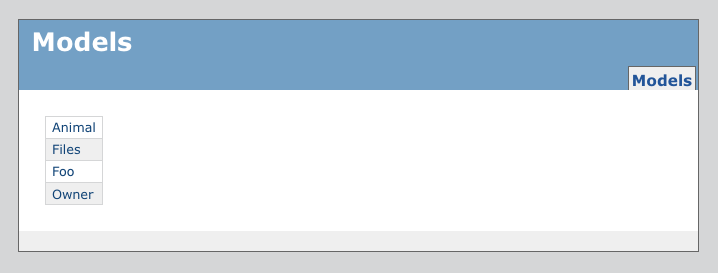
Sample model listing:
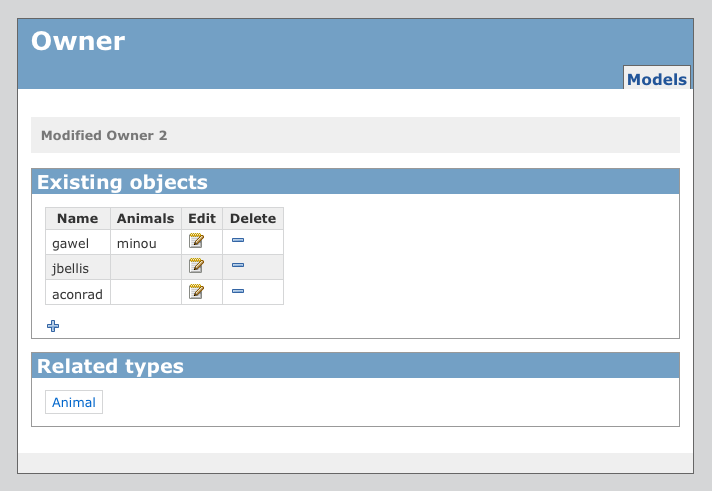
Sample model overview page:
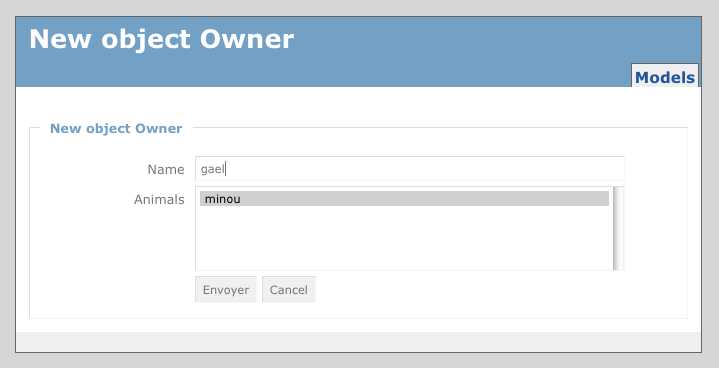
Sample model creation page:
Setup
First, generate a controller in your application:
$ paster controller admin
Next, edit your controllers/admin.py, replacing pylonsapp with your
application name:
import logging
from formalchemy.ext.pylons.controller import ModelsController
from webhelpers.paginate import Page
from pylonsapp.lib.base import BaseController, render
from pylonsapp import model
from pylonsapp import forms
from pylonsapp.model import meta

log = logging.getLogger(__name__)

class AdminControllerBase(BaseController):
    model = model # where your SQLAlchemy mappers are
    forms = forms # module containing FormAlchemy fieldsets definitions
    def Session(self): # Session factory
        return meta.Session

    ## customize the query for a model listing
    # def get_page(self):
    #     if self.model_name == 'Foo':
    #         return Page(meta.Session.query(model.Foo).order_by(model.Foo.bar)
    #     return super(AdminControllerBase, self).get_page()

AdminController = ModelsController(AdminControllerBase,
                                   prefix_name='admin',
                                   member_name='model',
                                   collection_name='models',
                                  )
Now you need to configure your routing. As an example here is the
routing.py used for testing the UI. Check fa_static and the /admin
part:
"""Routes configuration

The more specific and detailed routes should be defined first so they
may take precedent over the more generic routes. For more information
refer to the routes manual at http://routes.groovie.org/docs/
"""
from routes import Mapper

def make_map(config):
    """Create, configure and return the routes Mapper"""
    map = Mapper(directory=config['pylons.paths']['controllers'],
                 always_scan=config['debug'])
    map.minimization = False

    # The ErrorController route (handles 404/500 error pages); it should
    # likely stay at the top, ensuring it can always be resolved
    map.connect('/error/{action}', controller='error')
    map.connect('/error/{action}/{id}', controller='error')

    # CUSTOM ROUTES HERE
    # Map the /admin url to FA's AdminController
    # Map static files
    map.connect('fa_static', '/admin/_static/{path_info:.*}', controller='admin', action='static')
    # Index page
    map.connect('admin', '/admin', controller='admin', action='models')
    map.connect('formatted_admin', '/admin.json', controller='admin', action='models', format='json')
    # Models
    map.resource('model', 'models', path_prefix='/admin/{model_name}', controller='admin')

    # serve couchdb's Pets as resource
    # Index page
    map.connect('couchdb', '/couchdb', controller='couchdb', action='models')
    # Model resources
    map.resource('node', 'nodes', path_prefix='/couchdb/{model_name}', controller='couchdb')


    # serve Owner Model as resource
    map.resource('owner', 'owners')

    map.connect('/{controller}/{action}')
    map.connect('/{controller}/{action}/{id}')

    return map
All done! Now you can go to the /admin/ url.
Customization
ModelsController creates a new
class having AdminControllerBase and the internal FA models controller
(_ModelsController) as its parent
classes, in that order.
So, you can do simple customization just by overriding the
_ModelsController methods in
AdminControllerBase, e.g.,:
class AdminControllerBase(BaseController):
    ...

    @auth_required
    def edit(self, *args, **kwargs):
        return super(AdminControllerBase, self).edit(*args, **kwargs)
To customize the forms used to list and edit your objects,
create a module yourapp.forms and specify that
as the forms module in AdminController. In this module, create
FieldSet (for create and edit forms)
and Grid (for object lists)
instances for the models you wish to customize. (The Grids will
automatically get edit and delete links added, and be made readonly.)
See forms for details on form configuration.
API
Troubleshooting
If you don’t see all your models on the top-level admin page, you’ll need to import them into your model module, or tell FormAlchemy the correct module to look in (the “model = ” line in the controller class you created). In particular, FormAlchemy does not recursively scan for models, so if you have models in e.g., model/foo.py, you will want to add from foo import * in model/__init__.py.
RESTful controller
This module provide a RESTful controller for formalchemy’s FieldSets.
You can use your fieldset as a REST resource. And yes, it also works with JSON.
Usage
Use the FieldSetController to wrap your Pylons controller:
import logging

from pylons import request, response, session, url, tmpl_context as c
from pylons.controllers.util import abort, redirect

from pylonsapp.lib.base import BaseController, render
from pylonsapp import model
from pylonsapp.model import meta

from formalchemy.ext.pylons.controller import RESTController

log = logging.getLogger(__name__)

class OwnersController(BaseController):

    def Session(self):
        return meta.Session

    def get_model(self):
        return model.Owner

OwnersController = RESTController(OwnersController, 'owner', 'owners')
Add this to your config/routing.py:
map.resource('owner', 'owners')
Customisation
You can override the following methods:
Here is a customisation sample to use CouchDB as backend using the ModelsController (~= API):
__doc__ = """This is an example on ow to setup a CRUD UI with couchdb as
backend"""
import os
import logging
import pylonsapp
from couchdbkit import *
from webhelpers.paginate import Page
from pylonsapp.lib.base import BaseController, render
from couchdbkit.loaders import FileSystemDocsLoader
from formalchemy.ext import couchdb
from formalchemy.ext.pylons.controller import ModelsController

log = logging.getLogger(__name__)

class Person(couchdb.Document):
    """A Person node"""
    name = StringProperty(required=True)
    def __unicode__(self):
        return self.name or u''

class Pet(couchdb.Document):
    """A Pet node"""
    name = StringProperty(required=True)
    type = StringProperty(required=True)
    birthdate = DateProperty(auto_now=True)
    weight_in_pounds = IntegerProperty(default=0)
    spayed_or_neutered = BooleanProperty()
    owner = SchemaListProperty(Person)
    def __unicode__(self):
        return self.name or u''

# You don't need a try/except. This is just to allow to run FA's tests without
# couchdb installed. Btw this have to be in another place in your app. eg: you
# don't need to sync views each time the controller is loaded.
try:
    server = Server()
    if server: pass
except:
    server = None
else:
    db = server.get_or_create_db('formalchemy_test')

    design_docs = os.path.join(os.path.dirname(pylonsapp.__file__), '_design')
    loader = FileSystemDocsLoader(design_docs)
    loader.sync(db, verbose=True)

    contain(db, Pet, Person)

class CouchdbController(BaseController):

    # override default classes to use couchdb fieldsets
    FieldSet = couchdb.FieldSet
    Grid = couchdb.Grid
    model = [Person, Pet]

    def Session(self):
        """return a formalchemy.ext.couchdb.Session"""
        return couchdb.Session(db)

CouchdbController = ModelsController(CouchdbController, prefix_name='couchdb', member_name='node', collection_name='nodes')